

Digital health MVP design: what to include, what can wait
Digital health MVP design for founders: one user, one job, one proof point. What a HealthTech MVP must include and what can wait until after the pilot.
21 Oct 2026
A 10-minute healthcare app UX audit: five quick checks to find out if your health app is too complicated, and what to fix first.

A quick healthcare app UX audit takes about ten minutes: five two-minute checks on your most-used flow, done with a timer and one person who has never seen the app. Check the first screen, the words, the number of choices, what happens after a mistake and whether someone with tired eyes can read it. If two checks fail, your app is too complicated for the people who need it most.
Every founder thinks their app is simple. They’ve used it a thousand times. Their team has used it a thousand times. The problem is that nobody who matters has.
Health apps carry a heavier load than most. Your users may be unwell, worried, older, on medication or using the app on behalf of someone else. And people rarely stay to figure things out: in a 2019 JMIR study, the median mental health app kept just 3.9% of its users after 15 days.
A short audit like this one won’t replace testing with real users, but it tells you where to look first.
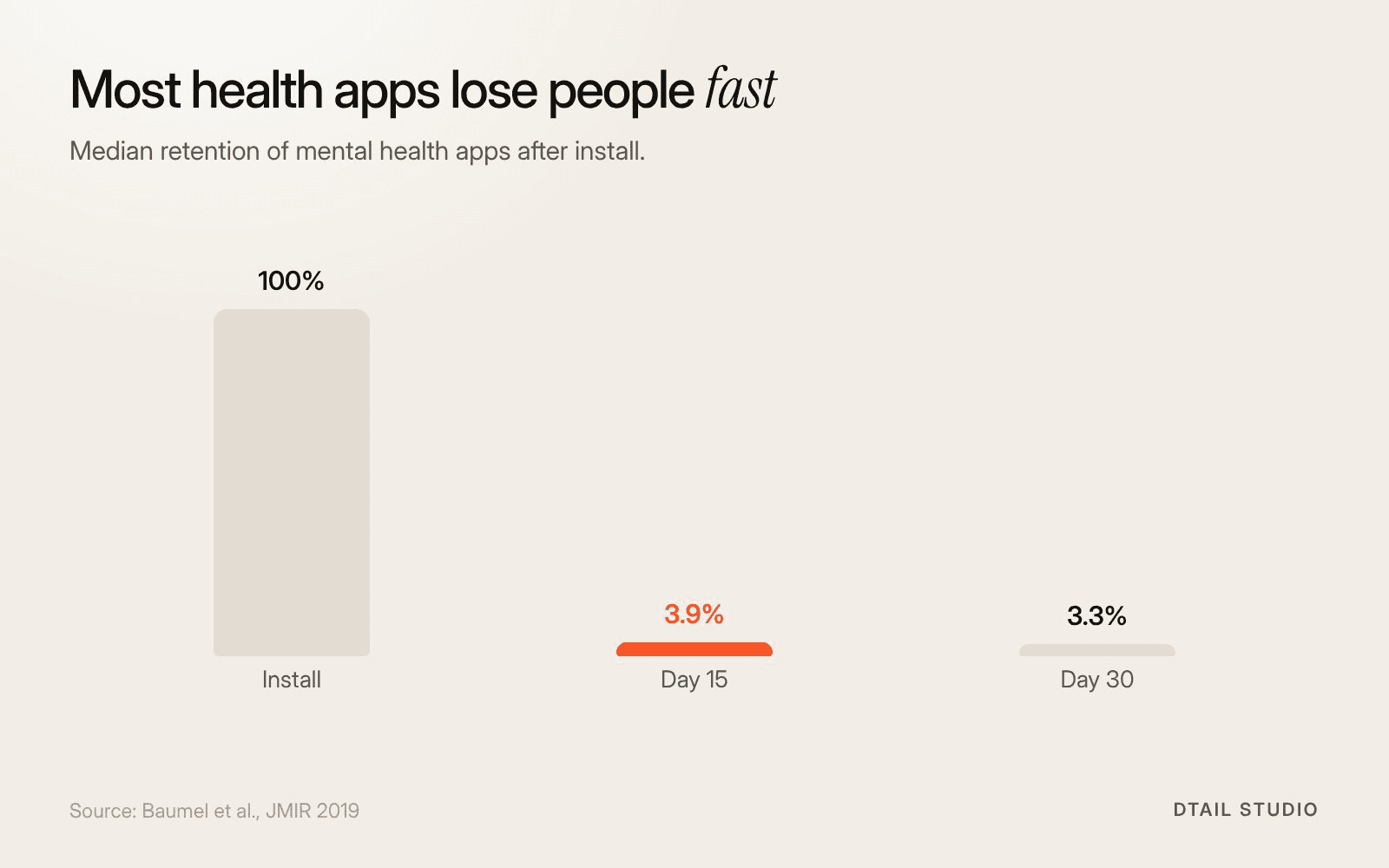
Median retention of mental health apps. Source: Baumel et al., JMIR 2019.
Because every stakeholder adds something and nobody takes anything away. Clinicians add fields, legal adds text, the board adds features, and the user gets all of it on a phone screen.
Meanwhile your users’ starting point is lower than you’d think. A WHO Europe survey found that between 25% and 75% of adults, depending on the country, have limited health literacy. And people don’t read screens carefully: Nielsen Norman Group found that on an average web page, users read about 20% of the words.
So the question isn’t whether your app is clear to you. It’s whether it’s clear to someone who reads a fifth of it, on a bad day.
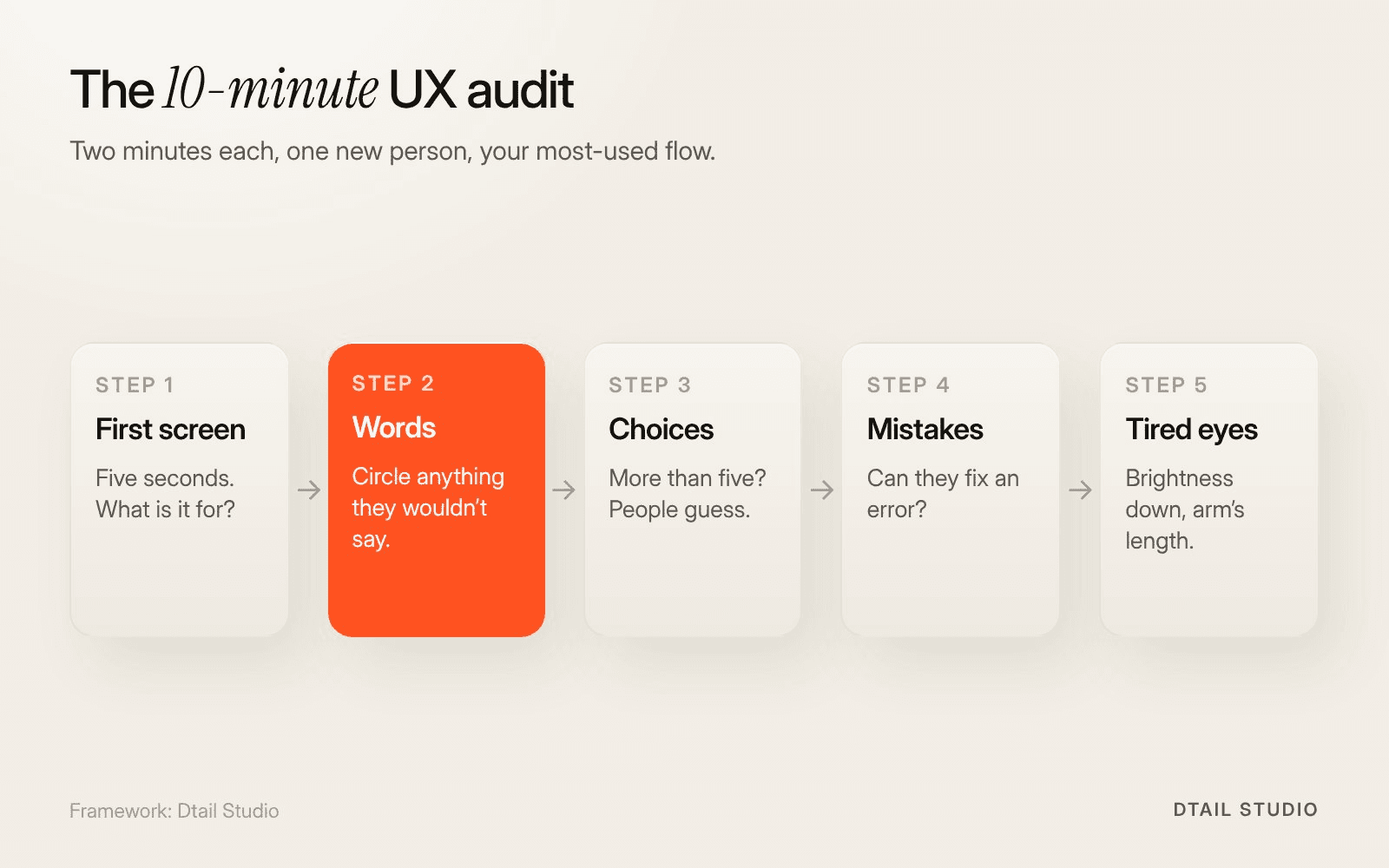
Five two-minute checks. Framework by Dtail Studio.
Pick your most-used flow, find one person who hasn’t seen the app, set a timer and run these five checks. Two minutes each. Write down what you see, not what you think it means.
The first screen test.
Show the first screen for five seconds and hide it. Ask: what is this for, and what would you do next? A wrong answer means the hierarchy is wrong.
The word test.
Read every button and heading aloud. Circle anything your tester wouldn’t say themselves: medical terms, internal names, abbreviations.
The choice test.
Count the things they can tap on the main screen. More than five equal-looking options and people start guessing.
The mistake test.
Ask them to enter something wrong on purpose. Can they see what happened and fix it without starting again?
The tired-eyes test.
Turn the brightness down, hold the phone at arm’s length and try it again. If they squint, your text or contrast is too weak.
Score each check pass or fail. The steps are in the figure, if you want to print them.
One fail is normal. Two or more means your users are working harder than they should, and some of them will quietly leave. The first screen and word tests usually fail together, because unclear labels make an unclear hierarchy.
Our point of view: fix the words before the visuals. Renaming three buttons and cutting one paragraph often does more than a new colour palette, and it costs an afternoon. Founders tend to reach for a redesign when they need an edit.
If you want a number to track over time, use the System Usability Scale, a ten-question survey. The average SUS score across 500 studies is 68. Below that, people find your product harder than most software they use. Health products should aim well above it.
Someone outside your team, with real users, once the quick audit has shown you where it hurts. A proper audit adds testing with five or so people from your actual user groups, a review of accessibility, and a prioritised list of fixes.
Our posts on designing apps for people with dementia and tech for older adults cover the specific checks for those users. If the audit says the whole flow needs rethinking, our post on what a HealthTech MVP should include helps decide what to keep.
We’d run the five checks with you, then test with your real users. For a health app, that usually means:
Quick audit of the top three flows.
The five checks above, done by us and by someone new to your app.
Test with five real users.
Patients, caregivers or clinicians, depending on who the app is for.
Accessibility and language review.
Contrast, text size, touch targets and every word on the key screens.
A prioritised fix list.
What to change this week, this month and at the next redesign, with the reason for each.
Bring access to the app, your analytics for the main flow and any user complaints. More on how we work.
This is close to where we started with Elli Cares, an app for people living with cognitive impairment and their families. The problems were high cognitive load, low contrast and an unclear hierarchy. We simplified the flows and moved to a high-contrast UI with a calm visual language. The Elli App is now used in 19 countries; the case study shows the before and after.
Who can audit the UX of my digital health product?
Start with the five checks yourself. For a deeper audit, choose a studio with health case studies that tests with your real users, not just a heuristic review.
How often should we audit?
Before every big release, and whenever retention drops. The quick version takes ten minutes, so there’s no excuse.
Is an audit the same as accessibility compliance?
No. An audit finds where people struggle. Compliance checks against a standard. You need both.
What’s the most common problem you find?
Words. Internal names on buttons and clinical terms in places where patients need plain ones.
Run the tired-eyes test on your own phone, now: brightness down, phone at arm’s length, open your app’s main screen. Read every label out loud. Anything you squint at or stumble over goes on a list. You’ll have three fixes before lunch.
If you’d like us to run the full audit with your users, let’s talk.
About the author: Rori Thompson is a Content Writer at Dtail Studio and writes about product design, UX and the details that make an app easy to use.
Sources: Baumel et al., Objective User Engagement With Mental Health Apps, JMIR 2019, WHO/Europe, Health information often difficult to interpret (HLS19, 2021), Nielsen Norman Group, How little do users read?, MeasuringU, Measuring usability with the System Usability Scale
Digital health MVP design for founders: one user, one job, one proof point. What a HealthTech MVP must include and what can wait until after the pilot.

Hand-picked design studios for 10 industries, from SaaS and HealthTech to real estate and education, with real projects you can check.

Seven healthcare UX design agencies in Europe with real health case studies, how we chose them and how a founder should compare them.