

Healthcare app UX audit: a 10-minute self-check
A 10-minute healthcare app UX audit: five quick checks to find out if your health app is too complicated, and what to fix first.
22 Oct 2026
Energy installer app design decides whether your product gets fitted and recommended. What installers need on site, and how to design for it.

Energy installer app design matters because installers decide whether your product gets fitted, recommended and set up properly. If your installer app is slow, confusing or unreliable on a roof or in a cold plant room, the homeowner never sees your beautiful app working. Design the installer’s half hour on site as carefully as the homeowner’s first week.
Every energy startup has a lovely homeowner app. Solar on the left, battery in the middle, a satisfying animation of electrons heading for the car. It’s in the deck, the website and the investor demo.
Then there’s the other app. The one an installer uses to pair the device, set the tariff, test the system and sign off the job. Nobody puts it in the deck. It’s often designed last, by whoever had time.
That’s backwards. In energy, the installer is often your real customer, and their app is where your brand either earns a recommendation or loses one.
Around 79% of solar jobs are in installation. Source: SolarPower Europe, 2022.
Because there aren’t enough of them, and homeowners trust them to choose. The IEA estimates that heat pump supply and installation could need over 1.3 million workers by 2030, nearly triple today’s number, with skilled labour shortages likely, especially for installers.
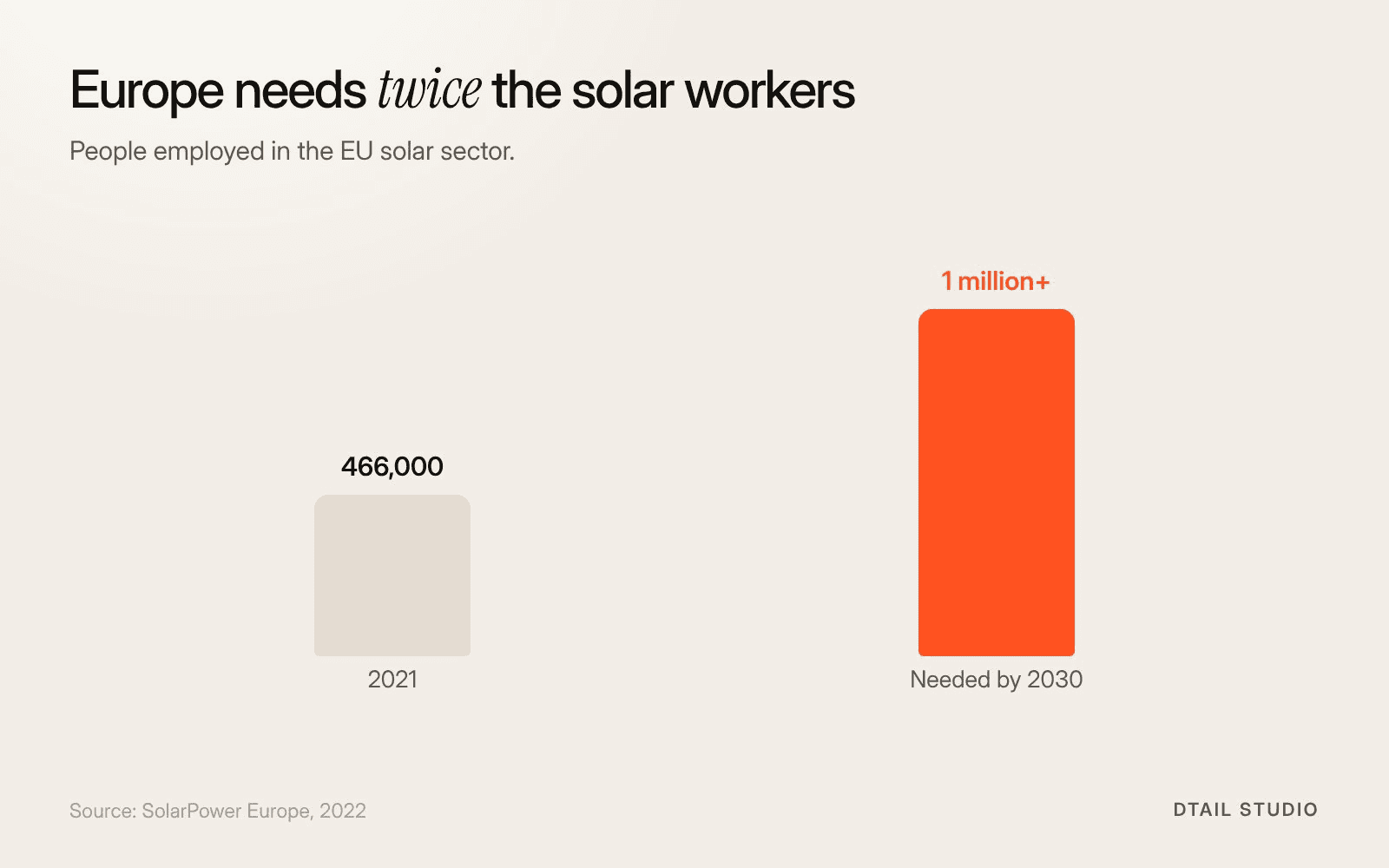
Solar tells the same story. SolarPower Europe found the EU solar sector employed 466,000 people in 2021 and will need over a million workers by 2030. Around 79% of solar jobs are in installation. The figure below shows the gap.
And installers don’t just fit products, they pick them. In a US survey of homeowners about heating and cooling systems, reported by ACHR News, 43% said they had relied on the contractor to decide the brand. That’s HVAC in general, not only heat pumps, but the pattern is familiar to anyone who has sold through installers.
When installers are scarce and influential, the product that’s easiest to install wins jobs.

A commissioning screen built for the van. Illustrative sketch by Dtail Studio.
Speed, certainty and a clean handover. An installer may fit several systems a week, across different brands, often in bad light with cold hands. Your app competes with every other app on their phone.
Setup that works first time.
Pairing, network and configuration in a short, linear flow with clear progress. No dead ends, no “contact support”.
Status they can trust.
A clear signal that each step has worked, and plain error messages that say what to do next.
Offline tolerance.
Plant rooms and roofs have bad signal. Save progress locally and sync later.
A proper handover.
A summary for the homeowner, the job record for the installer and a reason for the homeowner to open your app tomorrow.
The sketch in the second figure shows one commissioning screen built around those needs. It’s illustrative, but you can test every choice on it in a van.
The homeowner’s first impression is formed by the installer, not by your onboarding. If commissioning goes badly, the homeowner’s app starts with wrong data, a missing tariff or a device that drops offline. That’s where support tickets and one-star reviews come from.
Our point of view, and one you won’t hear in most pitches: the installer app deserves your best designer, not your newest one. A great homeowner app can’t rescue a bad install, but a great install makes a decent homeowner app look excellent.
Our posts on designing one app for the whole home and on why nobody understands a kilowatt-hour cover the homeowner side.
That brand and product have to say the same thing on every surface, including the boring ones. Cubee, an energy management startup, had strong technology and a fragmented visual presence. It needed to look approachable but credible, and to scale across decks, digital and physical products.
We designed the logo, brand strategy, identity, packaging and product design, built on a geometric symbol system based on energy flow and connection. Cubee has passed 2,000 installations. “Dtail helped us launch with a brand and product that stood out instantly,” says David Vondracek, founder and CEO. The full project is in the Cubee case study.
We’d go on site before we open a design file. For an energy startup selling through installers, that usually means:
Ride along on installs.
Watch two or three real jobs and note every moment the installer waits, guesses or calls someone.
Map the handover.
What the installer needs to finish, and what the homeowner needs to start. Design both ends.
Redesign the commissioning flow.
Short, linear, resumable, with clear status and plain errors.
Test it in real conditions.
Gloves, bad signal, a ladder. Then with the homeowner the next morning.
Bring your current installer flow, support tickets from installs and a list of your installer partners. More on how we work. If you’re also working on the brand, read how to brand a clean energy startup.
Should installers and homeowners use the same app?
Often one app with two modes works well. What matters is that each mode is designed for its user.
Who should we test the installer app with?
Your installer partners, ideally the ones who also install competitors’ products. They’ll tell you exactly how you compare.
Is the installer app worth design budget before launch?
Yes. It decides your support costs and your recommendations from day one.
What’s the most common installer complaint?
Setup that fails halfway with no clear way to resume. Fix that first.
Ask one of your installers to record their screen during their next commissioning, with permission from the homeowner. Watch it at double speed and mark every pause longer than ten seconds. Each pause is a question your app didn’t answer.
If you want help making your installer app the easiest one in the van, let’s talk.
About the author: Rori Thompson is a Content Writer at Dtail Studio and writes about product design, UX and the details that make an app easy to use.
Sources: IEA, The global energy crisis is driving a surge in heat pumps (2022), SolarPower Europe, Study reveals critical skills bottleneck (2022), ACHR News, Brand importance in the HVAC industry (2025)
A 10-minute healthcare app UX audit: five quick checks to find out if your health app is too complicated, and what to fix first.

Digital health MVP design for founders: one user, one job, one proof point. What a HealthTech MVP must include and what can wait until after the pilot.

Hand-picked design studios for 10 industries, from SaaS and HealthTech to real estate and education, with real projects you can check.