

AI health app design: features patients actually trust
AI health app design for founders: where AI belongs, how to show its source and certainty, when a person takes over, and what to leave out.
28 Oct 2026
AI SaaS product design that B2B buyers trust: where AI features lose deals, and the sources, undo, limits and admin screens that win them back.

Good AI SaaS product design earns B2B trust in the screens a demo skips: where an answer came from, how to edit or undo it, what the AI can’t do, and what an admin can switch off. Buyers forgive a wrong suggestion they can see and fix. They don’t forgive one they find later in a report.
An illustrative scene. A buyer’s ops lead is two weeks into a trial. The AI summary assigns a follow-up to the wrong person. She can’t see why, can’t find an undo, and the task has already gone out by email. The trial ends with “let’s revisit next quarter”, which everyone in sales knows is a polite goodbye.
Nobody in that story was against AI. Buyers use it all day and check it anyway. In Semrush’s July 2026 survey of 519 US B2B professionals who use AI at work, 75% fully or mostly trust AI vendor recommendations, yet 71% still visit the vendor’s website afterwards and 63% search Google. Trust, then verify. Your product should make the verifying easy.
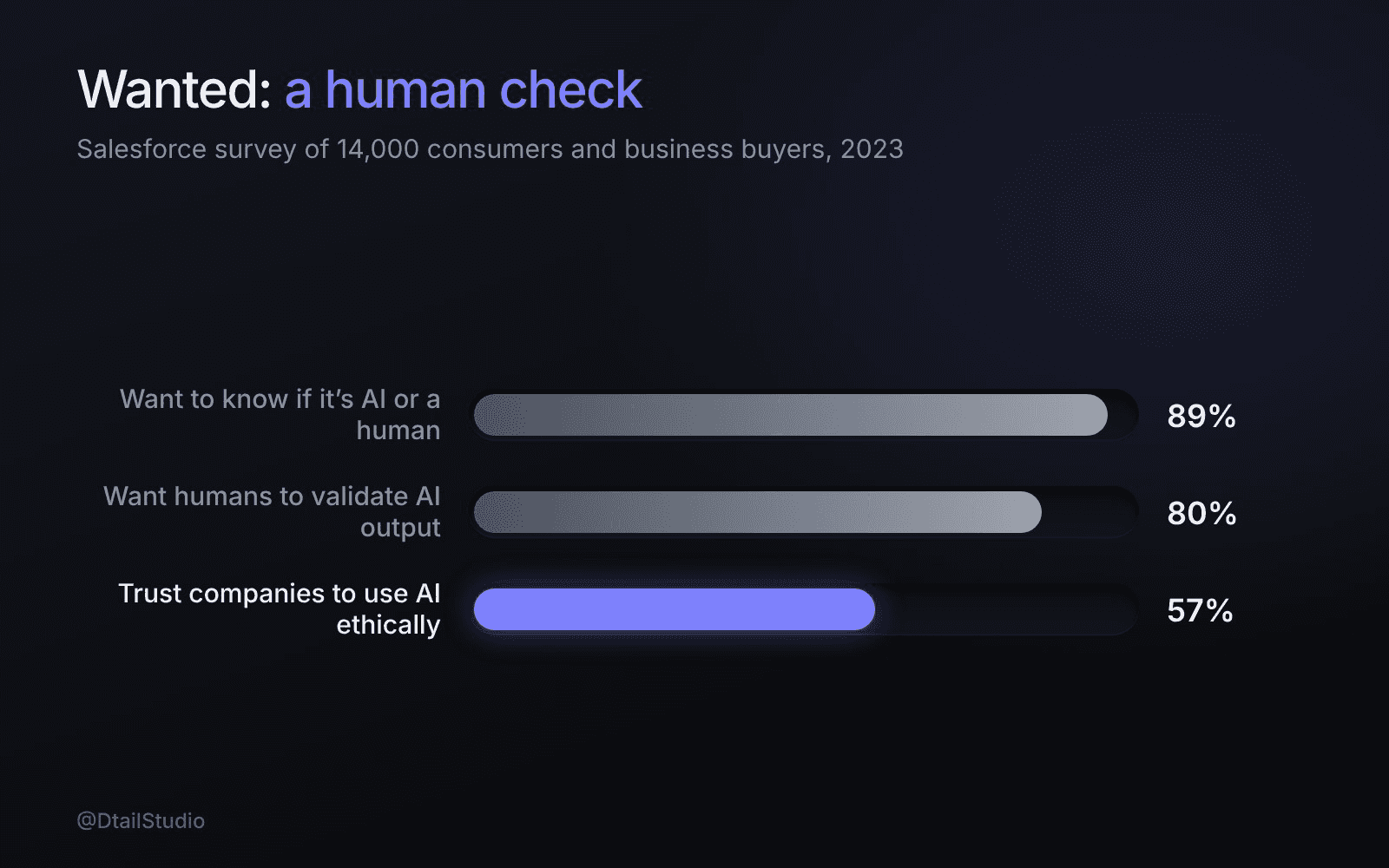
People want to know it’s AI and want a human check, but fewer trust companies with it. Source: Salesforce, State of the Connected Customer, August 2023.
Because in B2B, the person who buys signs for the mistakes the person who uses it will make. A consumer who gets a bad answer shrugs. A head of operations who approved a tool that sent a wrong number to a customer has to explain it to her boss.
The doubt runs wide. KPMG and the University of Melbourne surveyed more than 48,000 people in 47 countries, and only 46% said they’re willing to trust AI. In the same study, 56% of employees said they’d made mistakes in their work because of AI. Business buyers have cooled too: in Salesforce’s survey of 14,000 consumers and business buyers, the share of business buyers open to AI improving their experience fell from 82% in 2022 to 73% in 2023.
So the real job is making the risk look small, visible and reversible to the person signing.
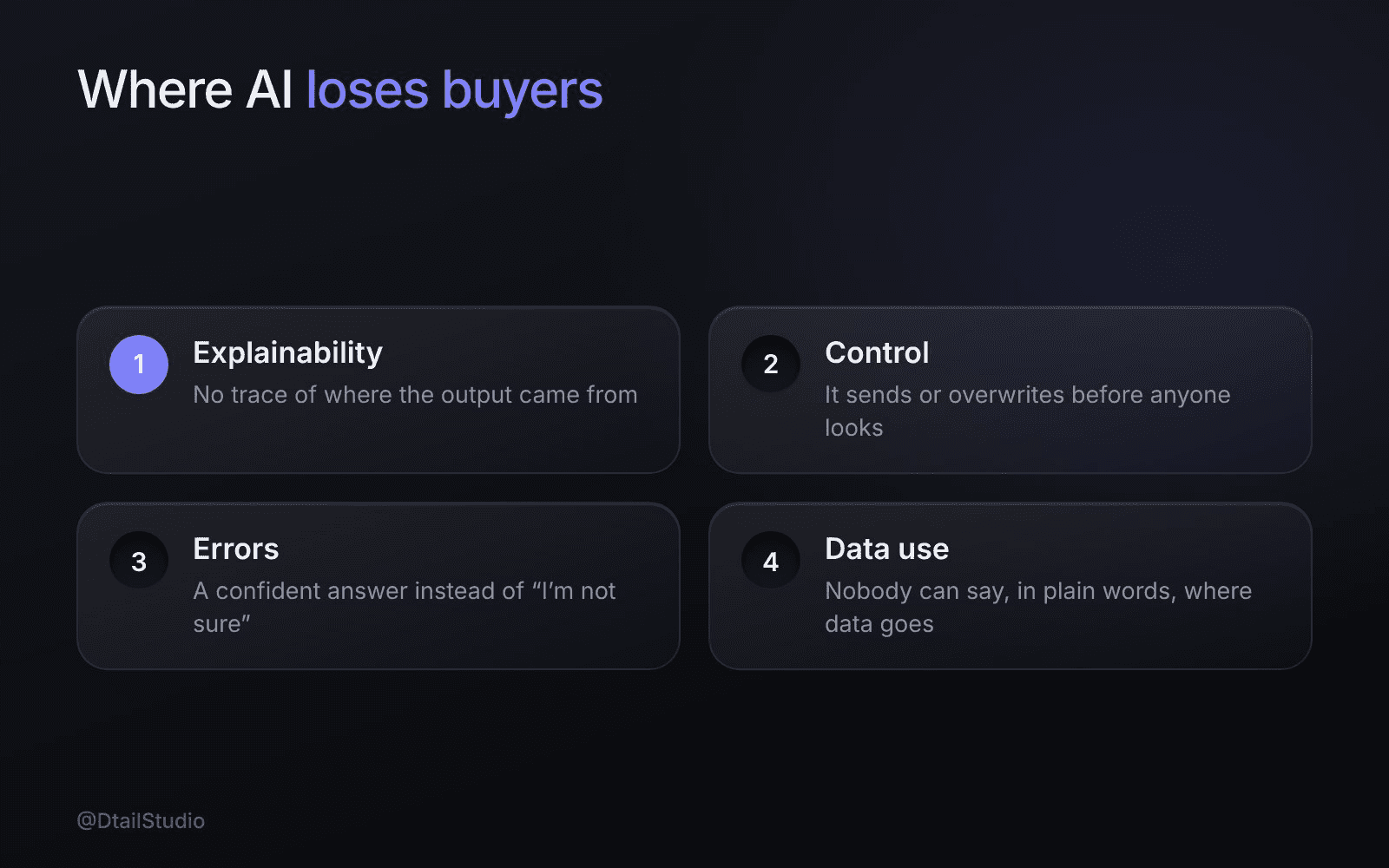
Where do AI features lose buyers? A summary of this section.
In four places, and none of them is the model itself.
Explainability.
The output appears with no trace of where it came from. The user can’t judge it, so she either trusts it blindly or ignores it.
Control.
The AI acts instead of suggesting. It sends, files or overwrites before anyone has looked. According to Pew’s 2025 survey of 5,023 US adults, about six in ten Americans want more control over how AI is used in their own lives. Your users are those same Americans, just on a Monday morning.
Errors.
The product shows a confident answer when it should say “I’m not sure” or “not enough data”. One confident mistake costs more trust than ten honest gaps.
Data use.
Nobody can find out, in plain words, whether customer data trains the model, where it’s stored or who can see it. That question comes up in the security review whether you answer it or not.
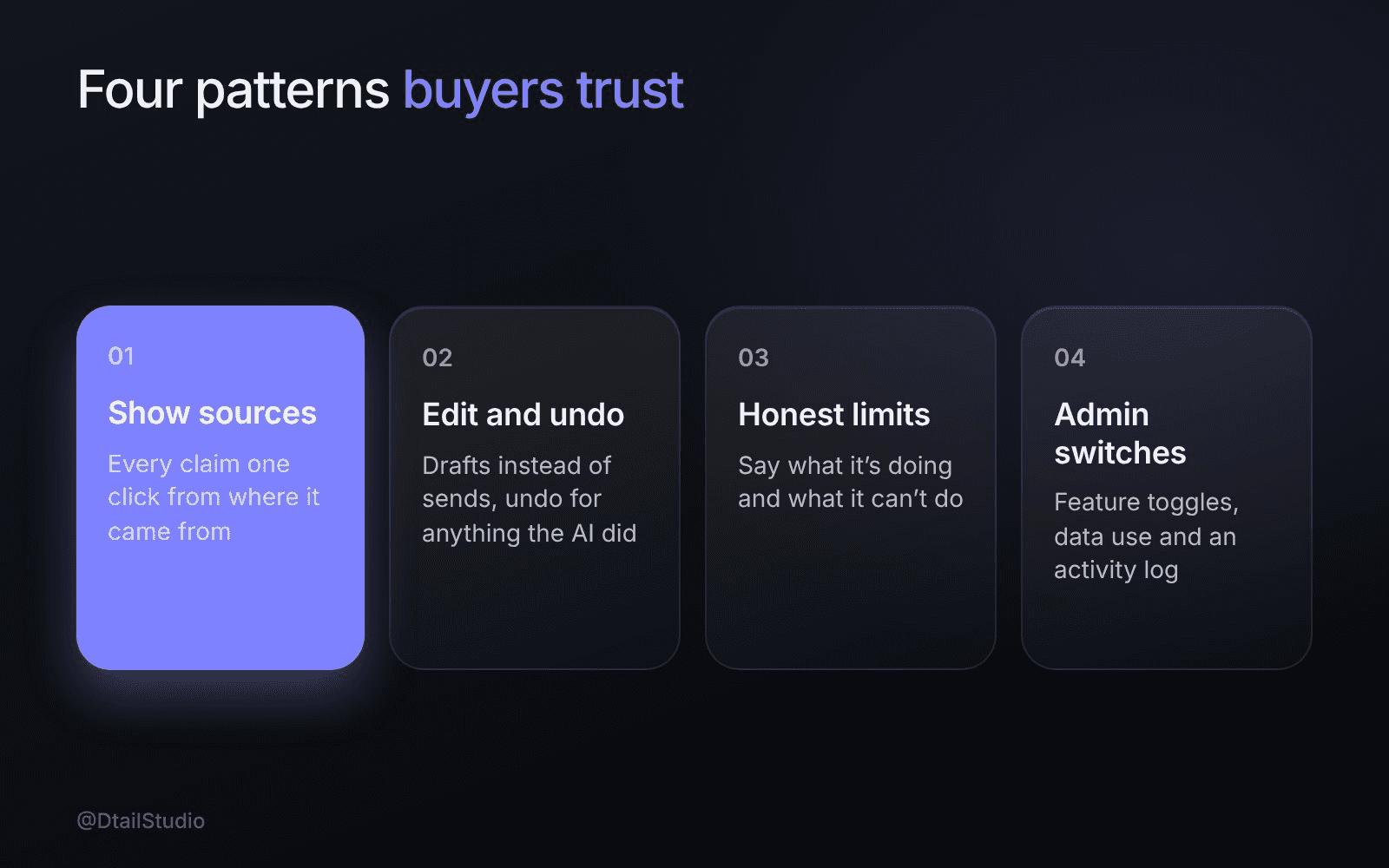
The four design patterns behind AI features buyers trust. Framework by Dtail Studio.
Four patterns cover most of it: show sources, make edit and undo cheap, be honest about loading and limits, and give admins the switches.
Show sources.
Link every claim to the transcript line, document or row it came from, one click away. Salesforce found 80% of customers say it’s important for humans to validate AI’s outputs. Sources let them do it without leaving your product.
Make edit and undo cheap.
AI output arrives as a draft the user can change in place. Anything the AI does on its own has an undo, and anything that leaves the product (an email, a sync, an invoice) waits for a person to approve it.
Be honest about loading and limits.
Say what it’s doing (“Reading 14 documents”) instead of showing a spinner. Say what it can’t do, in words, not a confidence score of 0.73. And label AI content as AI: 89% of customers in the same Salesforce survey want to know when they’re dealing with AI or a human. Small words carry a lot here, as our post on UX writing argues.
Give admins the switches.
One settings page where an admin turns each AI feature on or off for the workspace, sees what data it uses and reads a log of what the AI did and who approved it.
Because buyers test the cases the demo avoids. The demo shows the happy path. The pilot shows the wrong answer, the slow answer and the settings page, and that’s where the deal gets decided.
So design the error state before the hero screen, and put the AI settings page in the sales deck. A clear “here’s what it did, here’s how to undo it” screen tells a buyer more than another clip of a perfect summary. It also gives the security reviewer something to look at besides a promise.
Speed raises the stakes. Meeting Assistant, the AI workspace we designed for Modsi, captures transcription, translation, tasks and insights while the conversation is still happening. When output arrives that fast, the most important screen is the one where someone checks a task and fixes it before it goes anywhere.
The same habit of auditing the unglamorous screens runs through our SaaS dashboard audit checklist. It’s also why products that feel simpler as they grow usually got their edge cases right first.
We’d start with your last ten wrong outputs, not your best demo. Then:
Map every AI output and its failure.
For each feature: what it produces, what happens when it’s wrong, who notices and how fast.
Design the trust kit.
Source links, inline edit, undo, approval before anything leaves the product, and loading, limit and empty states written in plain words.
Design the admin and data screens.
Feature switches, data use explained in a sentence a buyer can paste into a procurement note, and an activity log.
Test with a buyer, not only a user.
Walk a security or ops lead through the settings and error states, and note every question the screens didn’t answer.
Bring a list of your AI features, real examples of wrong outputs, the security questionnaires you’ve received and notes from trials that stalled. More on how we work.
Should we show confidence scores?
Rarely as numbers. Most users can’t act on 0.73. Show the source and say plainly when the AI isn’t sure.
Do we need to label AI-generated content?
Yes. People want to know, and labels cost almost nothing. Pew found 76% of Americans say it’s extremely or very important to be able to tell whether text, pictures or video were made by AI or by people.
Should the AI ever act without approval?
Inside the product, with an undo, often yes. For anything that reaches a customer or another system, let a person approve it until the buyer’s admin chooses otherwise.
How much should we explain about the model?
Less than you think. Buyers ask what it uses, what it can’t do and how to turn it off. Answer those on a screen and save the architecture diagrams for the security call.
Take three recent wrong outputs from your AI feature. For each one, time how long it takes a new user to notice it’s wrong, find where it came from and fix or undo it. Anything over a minute, or anything that needs your support team, is your first design ticket.
If you’d like a second pair of eyes on your AI screens, let’s talk.
About the author: Rori Thompson is a Content Writer at Dtail Studio and writes about product design, UX and the details that make an app easy to use.
Sources: Semrush, How AI tools shape the B2B buying process (Margarita Loktionova, July 2026), Salesforce, State of the Connected Customer, AI trust findings (August 2023), KPMG and University of Melbourne, Trust, attitudes and use of AI: a global study (July 2025), Pew Research Center, How Americans View AI and Its Impact on People and Society (September 2025)
AI health app design for founders: where AI belongs, how to show its source and certainty, when a person takes over, and what to leave out.

When does a SaaS website redesign pay off? Five signs to check, what to fix first, and when a full redesign wastes a quarter.

Digital health app design for Europe and the US: one core product with local layers for language, units, dates, consent and trust cues.